Identify your remote-controlled Ventura, see how the filter, feed pump, Clark Pump and short membrane work together, and find model-specific service parts in Spectra's drawings.
12V or 24V DC · Remote Manual control · 7% Clark Pump · one short membrane
Select your installed voltage
Check the system and pump labels, particularly after a retrofit.
Showing parts common to both voltages. Select a voltage for electrical parts.
CHECK THE NAMEPLATE
Is this your Ventura 150R?
Model, controller and voltage
Look for VT-150R-12 or VT-150R-24 on the system paperwork or label. This guide covers the Remote Manual controller. Deluxe analog, MPC and Connect controls use different electrical parts. 200R-T Remote Manual guide is a separate output and pump-ratio configuration.
150 GPD rated output
Spectra rates this model at 6.3 US gal/h under 77°F / 25°C and 33,000 PPM baseline feed water. Actual output changes with feed conditions and system health. Manufacturer fact sheet ↗
The 150R fact sheet lists a minimum operating water temperature of 36°F / 2°C at its stated conditions. Confirm voltage and installed control generation before choosing electrical parts.
7% pump and one short membrane
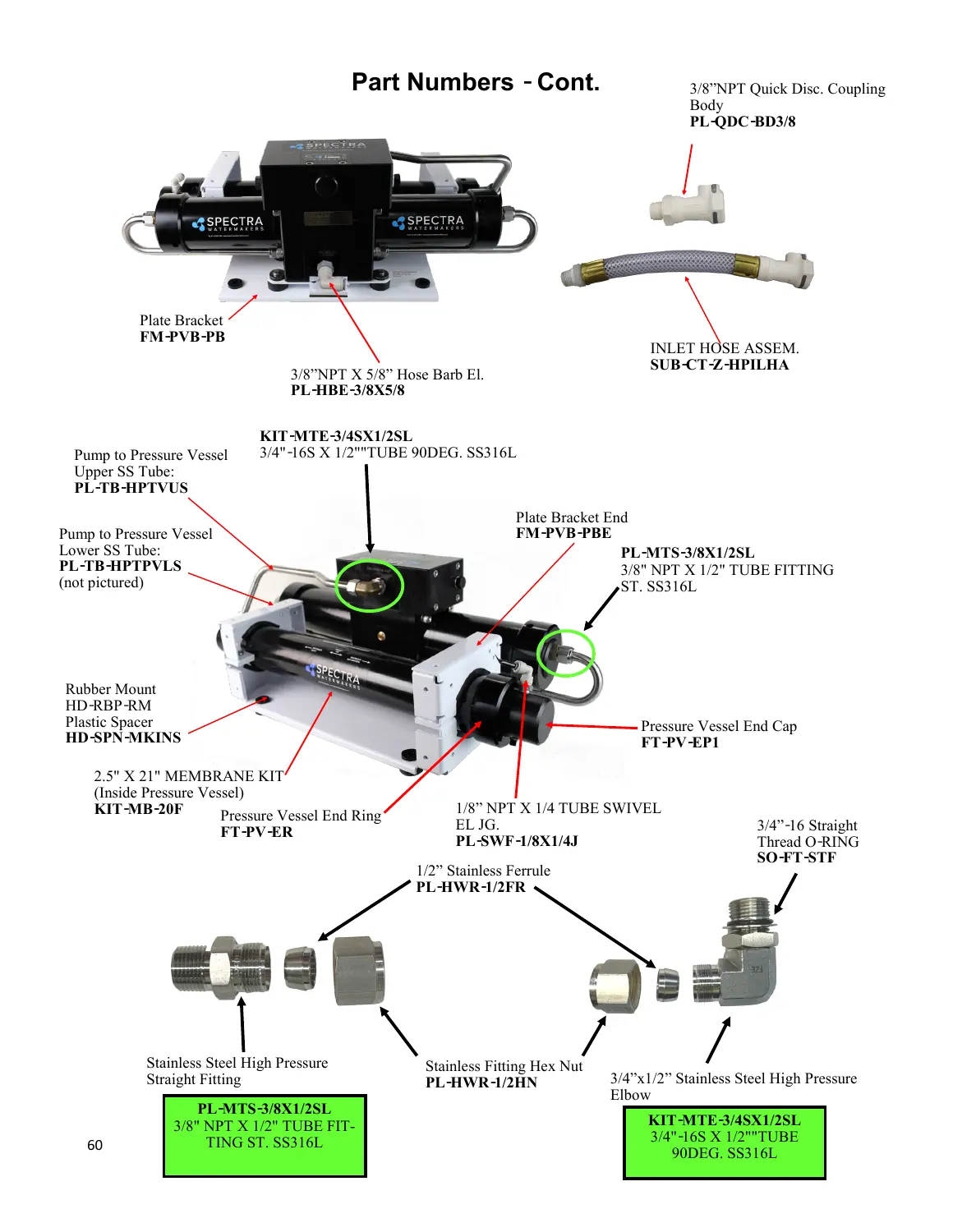
Use the 7% Clark Pump references for an original arrangement. The vessel houses a single short KIT-MB-20F membrane kit. Spectra calls it 20 inches in the fact sheet and 21 inches in the illustrated parts list. Match the kit SKU and installed vessel.
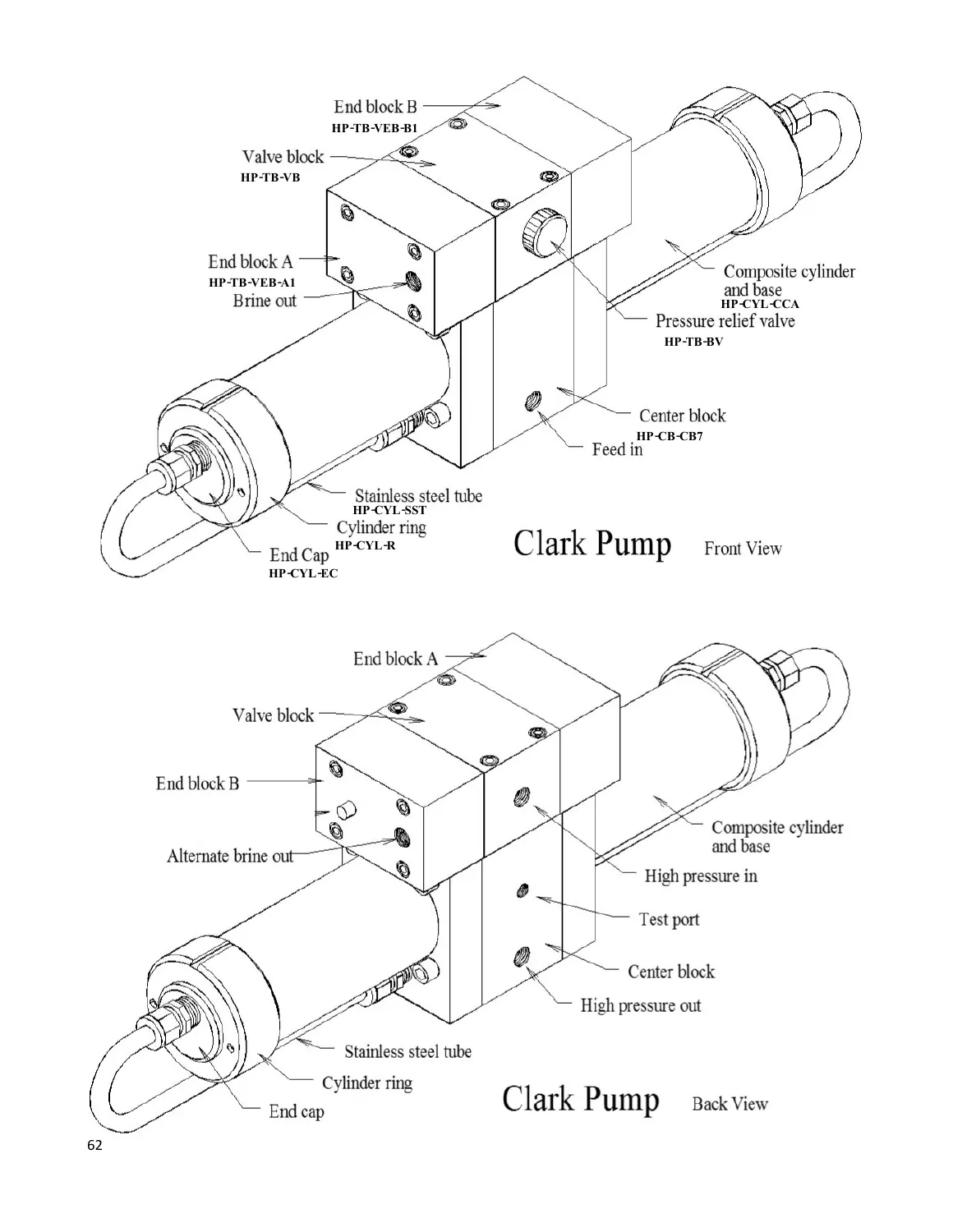
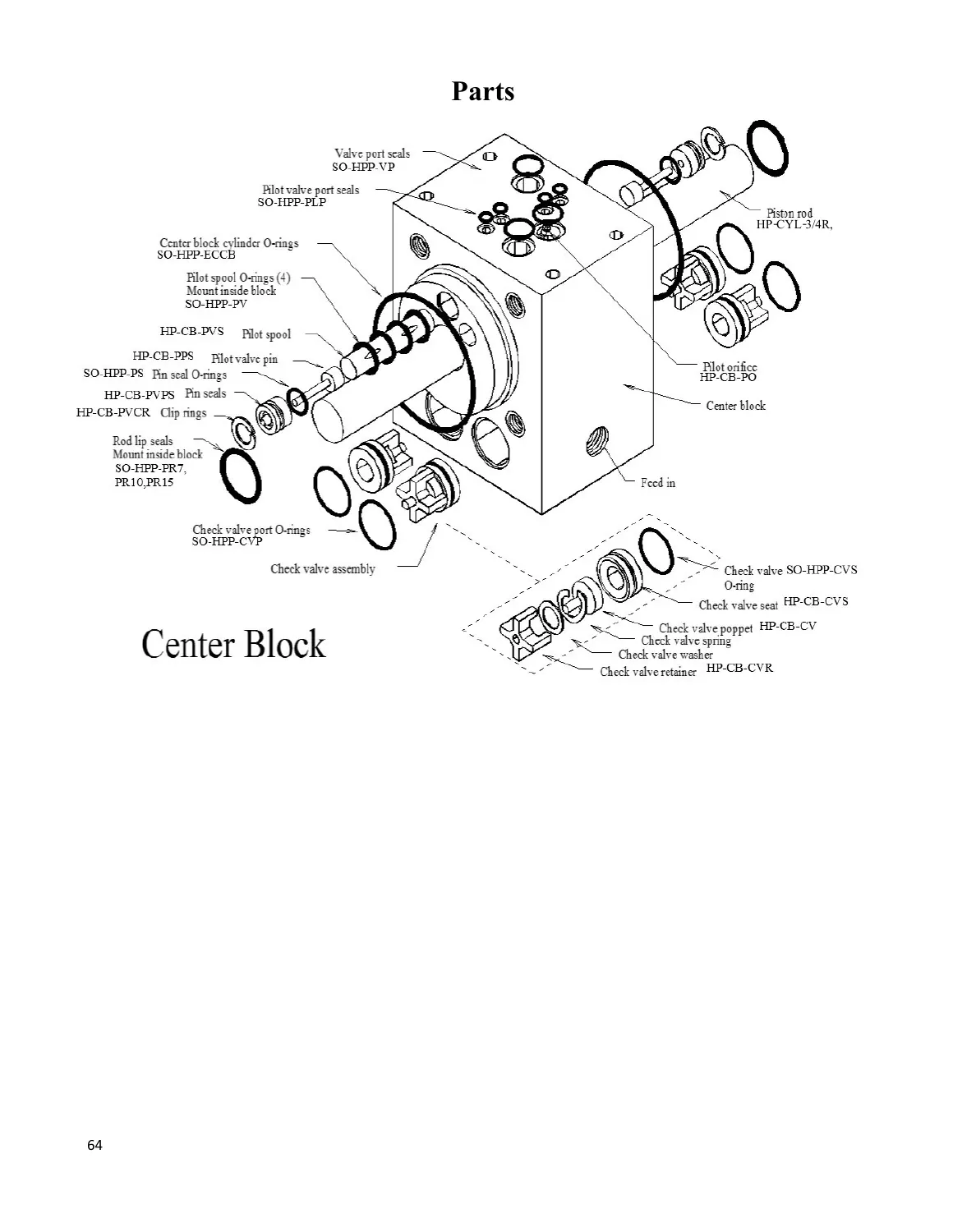
The Remote Manual illustrates a 7% center block and 3/4-inch piston rod on pages 62 and 64. The reviewed 150R mapping links HP-CB-CB7 and HP-CYL-3/4R. Read the installed pump identification before ordering internal parts.
FOLLOW THE WATER
What each module does
1 · Seawater intake
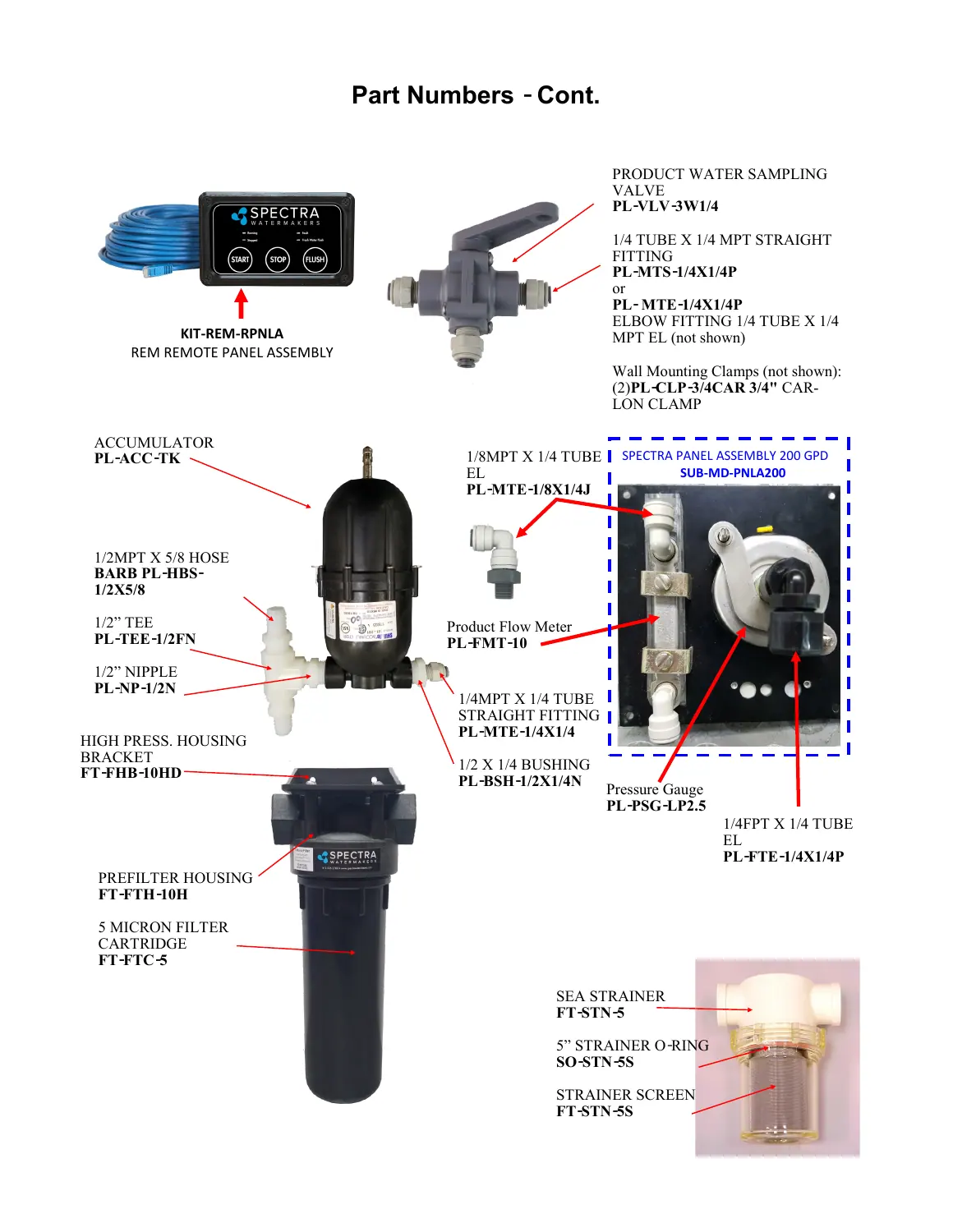
A dedicated intake and sea strainer admit seawater. Its screen and housing seal are distinct service parts. Keep debris out of the feed circuit.
The Clark Pump recovers pressure energy. The short membrane separates fresh product water from brine. The vessel retaining ring is separate from the membrane.
4 · Test and divert
The sample valve lets you check product water before diverting it to the tank. Follow the manual for start-up and product testing; do not treat this as a Connect salinity-sensor system.
Freshwater flush is separate
The carbon cartridge protects the freshwater flush path from chlorine. It is not a seawater prefilter. Optional Z-Ion replaces the standard carbon-filter bowl in Spectra’s plumbing drawing.
The standard seawater prefilter is nominal 10 × 2.5 inches, 5 micron. The separate freshwater-flush carbon cartridge is also nominal 10 × 2.5 inches. Check the installed housing style; nominal cartridge dimensions can differ from measured end-to-end length.
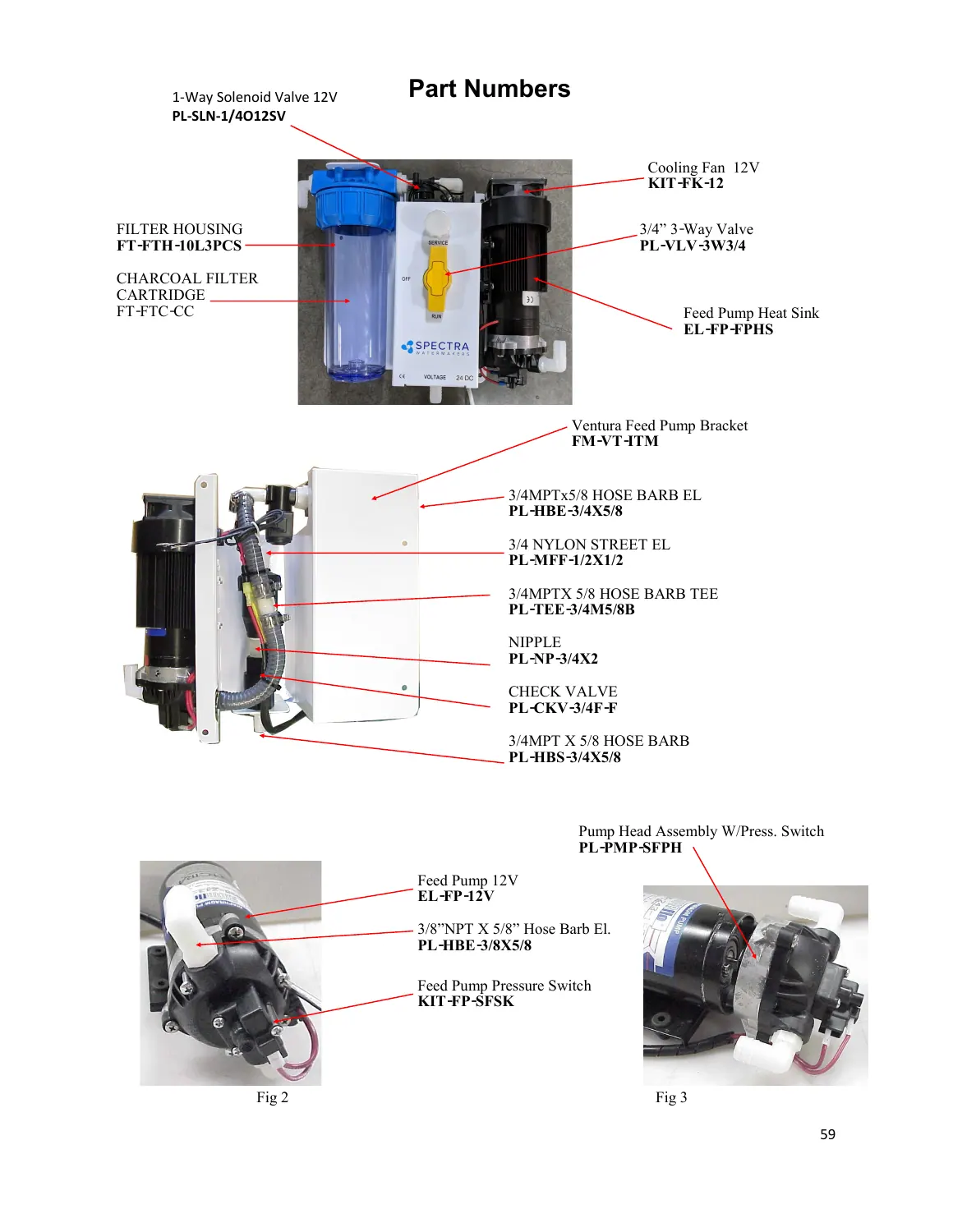
The controller operates the unit from a remote panel and supports a timed freshwater flush. A tank-full indication requires a tank switch. The Remote Manual drawing identifies KIT-REM-RPNLA remote panel on page 61 and EL-REM-CBA circuit board on page 58. These are separate service parts. Check the existing panel, connector, harness and board revision with Spectra before ordering; a board alone is not a complete controls conversion.
Voltage and wiring
Use the installed motor and controller labels for 12V versus 24V. The 150R fact sheet lists 12V DC at 9A and 24V DC at 4.5A. Match the installed supply and motor label rather than using the other voltage’s feed pump.
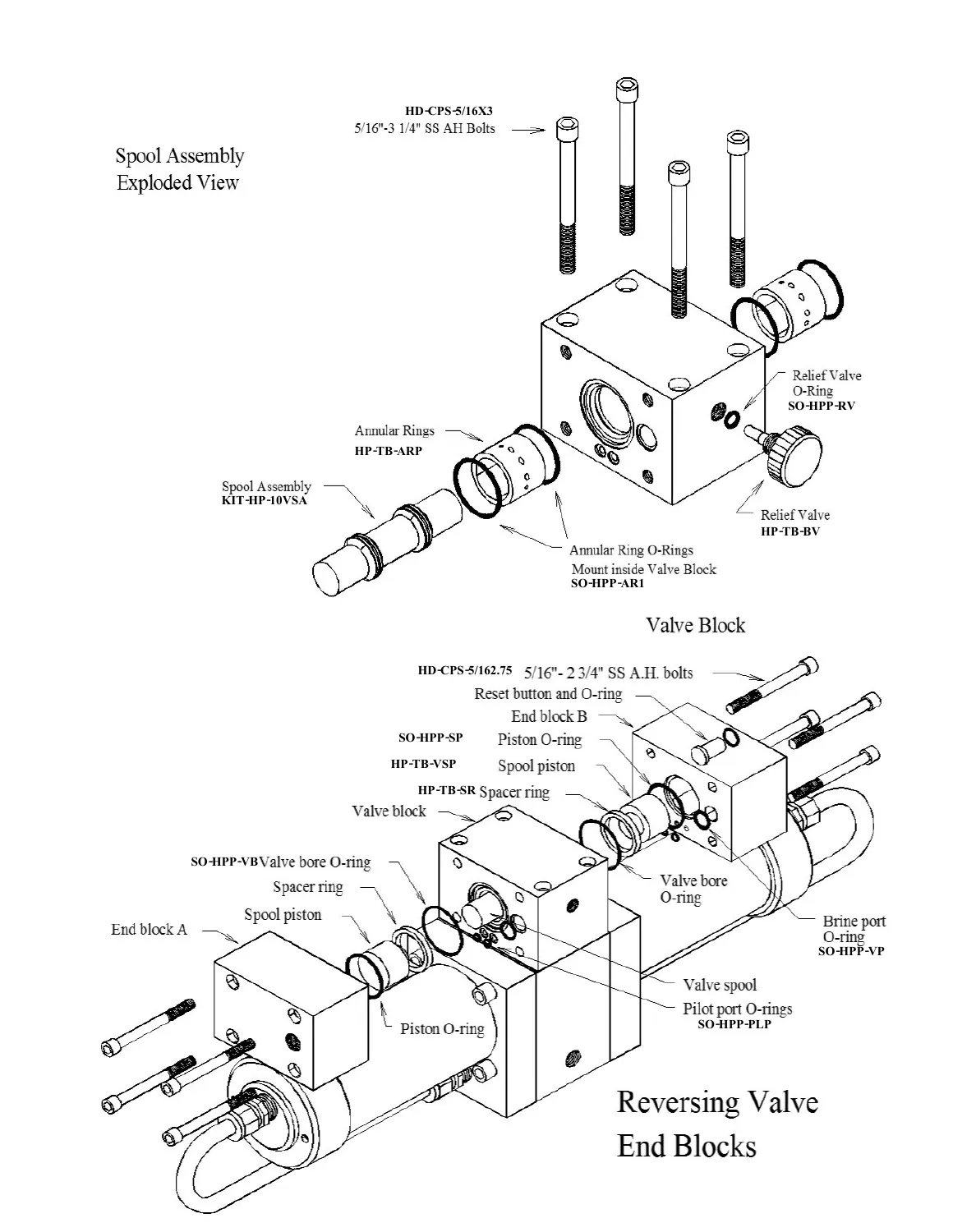
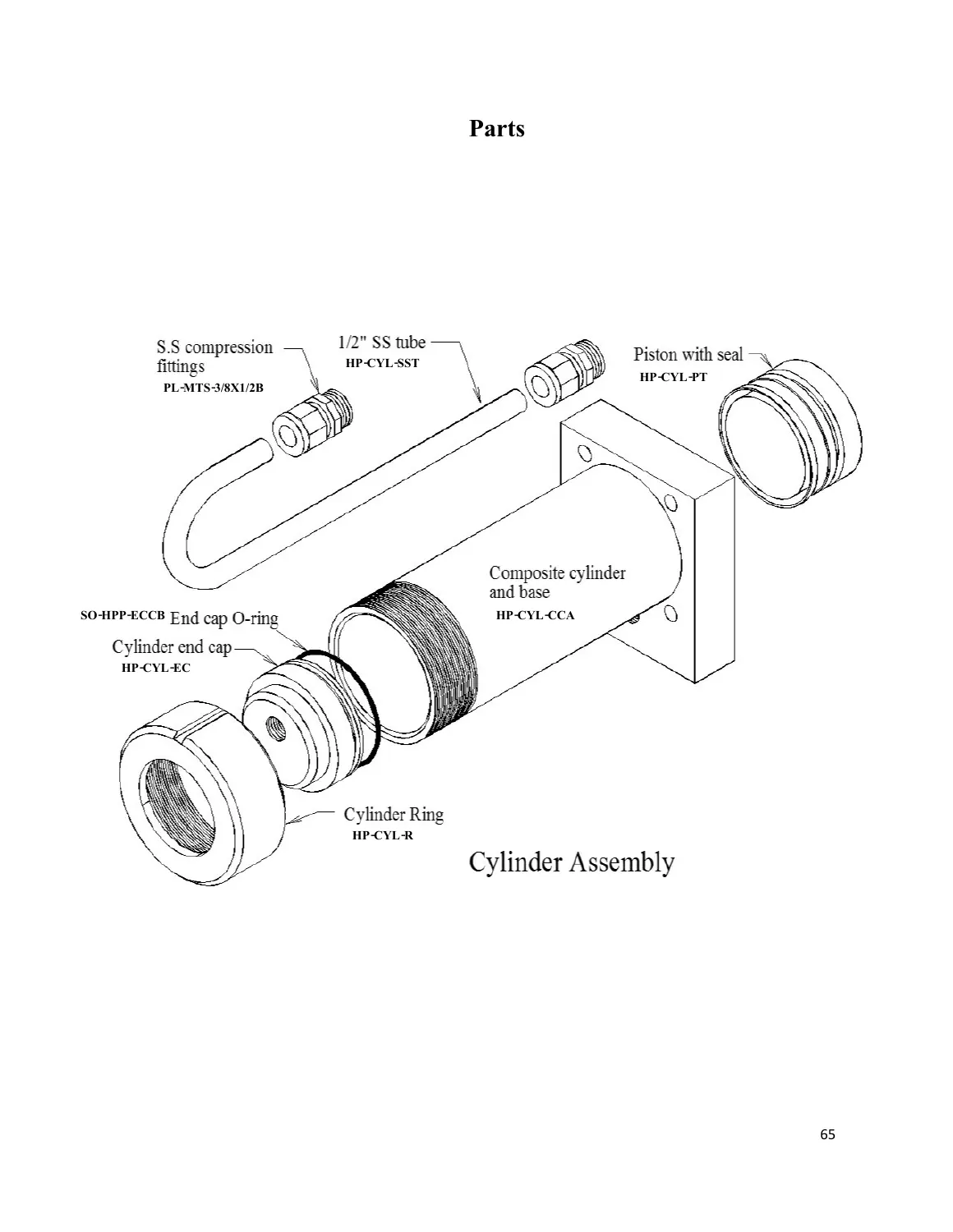
These are labeled pages from the Remote Manual, not a claim that every installed revision is identical. Open the complete drawing for tubing routes and other callouts.
The center block, piston rod and rod seals must match the actual pump ratio: HP-CB-CB7, HP-CYL-3/4R and SO-HPP-PR7 for the reviewed Ventura 150R arrangement. The 7% distributor rebuild kit is a separate service option. The seal and O-ring kit is shared by 7% and 10% pumps; compare kit contents before ordering individual seals.
Explore the 7% mechanical group in 3D. This Deluxe model is a location aid for the Clark Pump only; its controller and exterior modules do not establish Remote Manual fitment.
The Remote Manual illustrates a 7% center block and 3/4-inch piston rod on pages 62 and 64. The reviewed 150R mapping links HP-CB-CB7 and HP-CYL-3/4R. Read the installed pump identification before ordering internal parts.
View the four pump service drawings
The mechanical illustrations are identification aids, not a substitute for the rebuild procedure.
7% pump exterior
Use the manufacturer drawing to recognize the service group. Match your installed pump ratio and revision before choosing an internal replacement.
Follow the manual’s freshwater-flush procedure. Replace the carbon element at least every six months; optional Z-Ion uses a different bowl. Flush filter service ↗
Diagnose low output
Check feed voltage, filter restriction and feed-pump flow before assuming the membrane has failed. The manual calls for a flow test before membrane cleaning. Ventura flow test ↗
No. This guide covers the basic Remote Manual controller and its remote panel. The Connect display, harness and controls are different.
Does this model use a 20-inch or a 21-inch membrane?
Spectra’s fact sheet says 20 × 2.5 inches, while the parts drawing calls KIT-MB-20F 21 inches. Identify the kit by its SKU and short installed pressure vessel.
Is the carbon cartridge the seawater prefilter?
No. FT-FTC-5 filters seawater before the Clark Pump. FT-FTC-CC filters the freshwater used for flushing.
Can I order a pump internal from the shared drawing?
Confirm the pump identification. The shared Remote Manual illustrates 7% exterior hardware; this 150R guide uses 7% ratio-specific references for the reviewed original arrangement. Retrofitted pumps can differ.
Does the 3D model show this exact controller?
No. The earlier Ventura Deluxe 3D pump is a mechanical identification aid only. Use the Remote Manual and installed labels for the controller, wiring and external module details.
FIND A PRODUCT
Parts reference by voltage
Manufacturer drawing labels and documented mechanical references are first. Additional links from the existing parts mapping appear in a review section. The page does not set purchase quantities or guarantee that a retrofit uses original hardware.
99 references across both voltages.
No matching parts. Clear the search or choose another voltage.
Named in the manual or ratio-specific drawing
EL-REM-CBA
REM Circuit Board Assembly
12V / 24V · SKU in Remote Manual
What to check and source
The Remote Manual drawing names the circuit board. Confirm installed controller generation, connector and harness with Spectra before ordering.
More mapped parts that need an installed-hardware check
These links come from earlier configuration research. Confirm the exact SKU and revision with Spectra before ordering, especially controls, solenoids and hardware changed by a retrofit.
SC-1
Storage Compound
12V / 24V · Installed-hardware review
Confirm with Spectra before ordering.
What to check and source
Earlier configuration research links this part, but the current Remote Manual does not print this exact SKU. Confirm installed hardware and revision with Spectra before ordering.
Earlier configuration research links this part, but the current Remote Manual does not print this exact SKU. Confirm installed hardware and revision with Spectra before ordering.
Earlier configuration research links this part, but the current Remote Manual does not print this exact SKU. Confirm installed hardware and revision with Spectra before ordering.
Earlier configuration research links this part, but the current Remote Manual does not print this exact SKU. Confirm installed hardware and revision with Spectra before ordering.
Earlier configuration research links this part, but the current Remote Manual does not print this exact SKU. Confirm installed hardware and revision with Spectra before ordering.
Earlier configuration research links this part, but the current Remote Manual does not print this exact SKU. Confirm installed hardware and revision with Spectra before ordering.
Earlier configuration research links this part, but the current Remote Manual does not print this exact SKU. Confirm installed hardware and revision with Spectra before ordering.
Earlier configuration research links this part, but the current Remote Manual does not print this exact SKU. Confirm installed hardware and revision with Spectra before ordering.
Earlier configuration research links this part, but the current Remote Manual does not print this exact SKU. Confirm installed hardware and revision with Spectra before ordering.
Earlier configuration research links this part, but the current Remote Manual does not print this exact SKU. Confirm installed hardware and revision with Spectra before ordering.
Earlier configuration research links this part, but the current Remote Manual does not print this exact SKU. Confirm installed hardware and revision with Spectra before ordering.
Earlier configuration research links this part, but the current Remote Manual does not print this exact SKU. Confirm installed hardware and revision with Spectra before ordering.
Earlier configuration research links this part, but the current Remote Manual does not print this exact SKU. Confirm installed hardware and revision with Spectra before ordering.
Earlier configuration research links this part, but the current Remote Manual does not print this exact SKU. Confirm installed hardware and revision with Spectra before ordering.
Earlier configuration research links this part, but the current Remote Manual does not print this exact SKU. Confirm installed hardware and revision with Spectra before ordering.
Earlier configuration research links this part, but the current Remote Manual does not print this exact SKU. Confirm installed hardware and revision with Spectra before ordering.
Earlier configuration research links this part, but the current Remote Manual does not print this exact SKU. Confirm installed hardware and revision with Spectra before ordering.
Earlier configuration research links this part, but the current Remote Manual does not print this exact SKU. Confirm installed hardware and revision with Spectra before ordering.
Earlier configuration research links this part, but the current Remote Manual does not print this exact SKU. Confirm installed hardware and revision with Spectra before ordering.
Earlier configuration research links this part, but the current Remote Manual does not print this exact SKU. Confirm installed hardware and revision with Spectra before ordering.
Earlier configuration research links this part, but the current Remote Manual does not print this exact SKU. Confirm installed hardware and revision with Spectra before ordering.
Earlier configuration research links this part, but the current Remote Manual does not print this exact SKU. Confirm installed hardware and revision with Spectra before ordering.
Earlier configuration research links this part, but the current Remote Manual does not print this exact SKU. Confirm installed hardware and revision with Spectra before ordering.
Earlier configuration research links this part, but the current Remote Manual does not print this exact SKU. Confirm installed hardware and revision with Spectra before ordering.
Earlier configuration research links this part, but the current Remote Manual does not print this exact SKU. Confirm installed hardware and revision with Spectra before ordering.
Earlier configuration research links this part, but the current Remote Manual does not print this exact SKU. Confirm installed hardware and revision with Spectra before ordering.
Earlier configuration research links this part, but the current Remote Manual does not print this exact SKU. Confirm installed hardware and revision with Spectra before ordering.
Earlier configuration research links this part, but the current Remote Manual does not print this exact SKU. Confirm installed hardware and revision with Spectra before ordering.
The high-pressure housing seal in the manual uses a shorter identifier; confirm the installed housing and this catalog seal with Spectra before ordering.
Earlier configuration research links this part, but the current Remote Manual does not print this exact SKU. Confirm installed hardware and revision with Spectra before ordering.
Earlier configuration research links this part, but the current Remote Manual does not print this exact SKU. Confirm installed hardware and revision with Spectra before ordering.
Earlier configuration research links this part, but the current Remote Manual does not print this exact SKU. Confirm installed hardware and revision with Spectra before ordering.
Earlier configuration research links this part, but the current Remote Manual does not print this exact SKU. Confirm installed hardware and revision with Spectra before ordering.
Earlier configuration research links this part, but the current Remote Manual does not print this exact SKU. Confirm installed hardware and revision with Spectra before ordering.
This guide links to product pages for current price and purchasing status. Match the installed system label, voltage and pump revision before ordering.